Skip to content
Model & Output Guide

GPT Image 2.6 API

The GPT Image 2.6 API lets developers describe an image or animation in a request and retrieve the result through a provider. This guide explains the GIF settings used by this studio, public provider rate references and a server-side queue example. GIF Generator AI does not issue public API keys; the consumer studio uses Google sign-in and paid credits.

Model Notes & Recorded Samples Provider API reference Recorded Samples
Compare provider rates and GIF request parameters. Keep credentials on your server; this guide never asks you to enter a key.

Availability Disclosure: Sign in with Google to generate with GPT Image 2.6 using paid credits: 7 per low GIF, 12 per medium GIF and 5 per medium PNG or SVG. Safety rejections do not deduct credits. GIF Generator AI is independent of OpenAI.

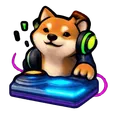
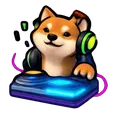
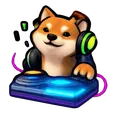
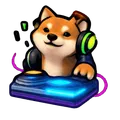
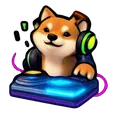
Transparent Sticker GIF – Neon DJ Shiba sample
Transparent GIF · 9 frames · 200 ms · 1.8s 816 × 816 · medium quality · transparent 798 KB

Transparent Sticker GIF – Neon DJ Shiba: 816 × 816 animated GIF, 9 frames at 200 ms per frame (1.8s seamless loop), medium quality, transparent background.

Sample prompt: A cool 3D stylized Shiba Inu DJ wearing oversized neon lime headphones bobbing its head to the beat behind a glowing holographic turntable, floating musical notes and neon magenta soundwaves, thick sticker outline, transparent background, 9-frame loop

Transparent Sticker GIF – Neon DJ Shiba (Transparent GIF · 9 frames) extracted frame 1 (0 ms)F01 · 0ms
Transparent Sticker GIF – Neon DJ Shiba (Transparent GIF · 9 frames) extracted frame 2 (200 ms)F02 · 200ms
Transparent Sticker GIF – Neon DJ Shiba (Transparent GIF · 9 frames) extracted frame 3 (400 ms)F03 · 400ms
Transparent Sticker GIF – Neon DJ Shiba (Transparent GIF · 9 frames) extracted frame 4 (600 ms)F04 · 600ms
Transparent Sticker GIF – Neon DJ Shiba (Transparent GIF · 9 frames) extracted frame 5 (800 ms)F05 · 800ms
Transparent Sticker GIF – Neon DJ Shiba (Transparent GIF · 9 frames) extracted frame 6 (1000 ms)F06 · 1000ms
Transparent Sticker GIF – Neon DJ Shiba (Transparent GIF · 9 frames) extracted frame 7 (1200 ms)F07 · 1200ms
Transparent Sticker GIF – Neon DJ Shiba (Transparent GIF · 9 frames) extracted frame 8 (1400 ms)F08 · 1400ms
Transparent Sticker GIF – Neon DJ Shiba (Transparent GIF · 9 frames) extracted frame 9 (1600 ms)F09 · 1600ms
Technical Specification

Provider Rates & Queue Reference

GPT Image 2.6 API public provider rates recorded November 5, 2026. USD per million tokens; check the source listing before integrating.
GPT Image 2.6 API token category OpenAI public rate fal public rate
Text input $5 $5
Cached text input $1.25 $1.25
Image input $8 $8
Cached image input $2 $2
Image output $30 $30
JAVASCRIPT GPT Image 2.6 API server-side queue example. Requests can incur provider charges. Keep FAL_KEY on your server and use the returned status_url and response_url to track the job.
// Run only on a server; never expose FAL_KEY to browser code.
const key = process.env.FAL_KEY;
if (!key) throw new Error("Missing server FAL_KEY");
const response = await fetch(
  "https://queue.fal.run/openai/gpt-image-2.6/flare/text-to-image",
  {
    method: "POST",
    headers: { Authorization: `Key ${key}`, "Content-Type": "application/json" },
    body: JSON.stringify({
      prompt: 'A cool 3D stylized Shiba Inu DJ wearing oversized neon lime headphones bobbing its head to the beat behind a glowing holographic turntable, floating musical notes and neon magenta soundwaves, thick sticker outline, transparent background, 9-frame loop',
      image_size: { width: 816, height: 816 },
      quality: "medium",
      reasoning_effort: "low",
      num_images: 1,
      output_format: "gif",
      background: "transparent",
      frame_count: 9,
      frame_duration_ms: 200
    })
  }
);
if (!response.ok) throw new Error(`Queue submission failed: ${response.status}`);
const job = await response.json();
console.log({ request_id: job.request_id, status_url: job.status_url, response_url: job.response_url });
// Stop here. Poll status_url with a bounded policy, then retrieve response_url.
// Do not submit a second job merely because a local wait times out.
Section 01 · COMPARE

GPT Image 2.6 API pricing sources

The GPT Image 2.6 API rate table records public OpenAI and fal prices checked on November 5, 2026, in USD per million tokens: $5 for text input, $1.25 for cached text input, $8 for image input, $2 for cached image input and $30 for image output. These are public API rates, separate from the studio's paid-credit prices.

For your integration, check the model and rate units in the provider reference before integrating. Original OpenAI model reference: https://developers.openai.com/api/docs/models/gpt-image-2.6-flare . Original fal endpoint listing: https://fal.ai/models/openai/gpt-image-2.6/flare/text-to-image . Provider rates can change, so use the listed sources for a version-specific quote.

Section 02 · WORKFLOW

Choose a GPT Image 2.6 API listing by version

Choose an API listing that names the model version you intend to call. A page for an older model is a separate product and price. The kie references in the existing source list are https://kie.ai/gpt-image-2-6 and https://kie.ai/gpt-image-2-5 . Check the version and available terms directly before using either listing in an integration.

This studio uses the model through fal's openai/gpt-image-2.6/flare/text-to-image endpoint. Your own integration requires credentials from the provider. A GIF Generator AI account or a ChatGPT subscription does not supply those credentials. Keep the consumer studio and your provider billing separate.

Section 03 · SAMPLE

Set GPT Image 2.6 API GIF parameters

For a short loop, the example sets an 816 × 816 canvas, output_format=gif, frame_count=9 and frame_duration_ms=200. Nine frames at that delay make a 1.8-second loop. The DJ Shiba prompt requests one medium-quality output with a transparent background and low reasoning effort. Describe one repeatable action and give any caption a stable area.

Use the output format that suits the job. GIF carries animation, PNG supplies a still image and SVG supplies a vector graphic. The studio offers low and medium GIF quality plus medium PNG and SVG. Check the options supported by your chosen provider before sending a different combination.

Section 04 · PRIVACY

How to use the GPT Image 2.6 API queue safely

The example reads FAL_KEY from the server environment. Keep that value out of browser code, prompts and screenshots. The request returns status_url and response_url for the job. Store those queue references on your server so you can check status and retrieve the corresponding result.

Handle a queued job with bounded polling, clear error handling and a spending limit in your own application. A local timeout does not prove that the provider stopped processing. Check the existing job before submitting again, and keep downloaded results in storage you control.

Step-by-Step Workflow

GPT Image 2.6 API: Step-by-Step Method

  1. STEP 01

    Read the provider rate units

    Compare public provider prices in the same units. The table quotes rates per million tokens; it does not promise a fixed per-GIF bill. Keep those rates separate from the site's credit catalog.

  2. STEP 02

    Submit from your server

    Use the example as a starting point for a server-side request. Keep credentials private, choose supported parameters and account for charges on your provider account.

  3. STEP 03

    Track the GPT Image 2.6 API job

    Save the returned queue references and retrieve the result for that job. Check its status after a timeout before resubmitting. Review the file's format, dimensions, caption and animation before using it.

Technical FAQ

Frequently Asked Questions About GPT Image 2.6 API

Where do I get a GPT Image 2.6 API key?

Obtain credentials from your chosen provider and keep them on your server. GIF Generator AI does not issue public API keys. Use Google sign-in and paid credits for the consumer studio.

Is the GPT Image 2.6 API example free to run?

A request can incur charges on your provider account. The guide displays an example; it does not submit the job for you. Check the provider's pricing and set spending controls before integrating.

Which GIF parameters does the example use?

It requests one 816 × 816 GIF with nine frames at 200 ms each, medium quality, a transparent background and low reasoning effort. Keep the parameters consistent with the model and format your provider supports.

Does 816 × 816 apply to every image?

It is the GIF canvas used in the example. The studio also offers a 1024 × 1024 PNG option for still illustrations. Check dimensions against the selected format before submitting.

Can file size predict a provider bill?

A file's byte size is not its token usage. Use the provider's usage and billing information for cost, and keep the output dimensions and format with your request record.

Can I use an older model listing for 2.6 pricing?

Use a listing that explicitly names the requested version. A GPT Image 2.5 price does not quote GPT Image 2.6. Check the provider reference and the rate units before comparing.

Does the GPT Image 2.6 API return a finished GIF immediately?

The example submits a queued job and returns its status and result references. Your integration needs to retrieve that job's result and handle errors without blindly submitting a second request.

Does the example accept a photograph?

The example uses a text prompt. Check a provider's documented inputs before building another workflow. Real-person material needs lawful sourcing, rights and consent; face swapping and deceptive impersonation are not offered by this service.